
A Definitive Analysis of Property Notification, Virtualization, and BindingContext Reassignment**
When building dynamic list UIs in .NET MAUI, developers often assume that modifying a model property will automatically refresh the corresponding UI. Inside a CollectionView, however, this is not guaranteed at all. Many developers run into issues such as:
- UI elements not refreshing after property updates
- Some bindings updating, others remaining stale
- UI only refreshing after scrolling away and back
- Breakpoints showing PropertyChanged firing, yet no visual update
- List items showing outdated content after fast scrolling
- Changes appearing on the wrong row due to template reuse
This behavior is not a MAUI bug — it is a direct result of how BindingContext, virtualization, and change notification interact inside a highly optimized, recycled list environment.
This article explains, at a senior engineer level, why item-level UI updates fail and exactly how to architect your models for reliable, instant UI refresh.
Summary Card, TLDR
Why Property Changes Do Not Update UI in .NET MAUI CollectionView
1. ObservableCollection does NOT update UI for property changes
It only notifies Add, Remove, Move, Replace.
Item-level property changes require INotifyPropertyChanged on the model.
2. Incorrect or missing INotifyPropertyChanged breaks UI binding
If PropertyChanged is not raised, the CollectionView cannot refresh the cell,
and data appears stale until virtualization rebinds the view.
3. Updating the wrong object instance results in silent failure
Replacing a local variable does nothing.
UI updates only when modifying the same instance contained in the ItemsSource.
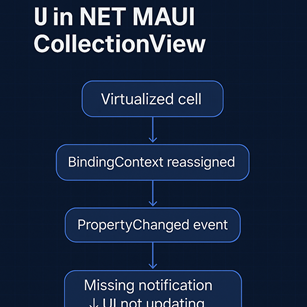
4. Virtualization creates timing gaps where the UI appears outdated
During fast scrolling, BindingContext reassignment may delay the visual update,
making the view appear unchanged temporarily.
5. Property updates from background threads cannot refresh UI
The Binding engine requires main-thread updates.
Use MainThread.BeginInvokeOnMainThread when modifying model properties.
6. Binding errors silently stop UI updates
Typos, incorrect paths, field bindings, or missing notifications
block MAUI from refreshing the cell without throwing errors.
Reliable Fixes
- Implement INotifyPropertyChanged properly
- Update the actual instance in the ObservableCollection
- Perform updates on the main thread
- Avoid async delays before modifying properties
- Keep templates lightweight to reduce rehydration lag
- Validate binding paths carefully
Core Principle
If UI does not update, the model did not properly notify,
or the CollectionView is still using an outdated BindingContext due to virtualization.
1. ObservableCollection Does Not Refresh Item Properties
Many developers incorrectly assume:
automatically propagates property changes.
In reality:
ObservableCollection ONLY raises notifications for Add / Remove / Move / Replace.
It does not update the UI when internal model properties change.
Example:
The UI does not update unless:
MyItem implements INotifyPropertyChanged correctly.
Without this, the binding engine simply has no signal to refresh the UI.
2. Incorrect INotifyPropertyChanged Implementation Is the #1 Cause of Broken UI Updates
Developers commonly write:
This property is completely invisible to MAUI’s binding system.
Correct implementation:
{
private string title;
public string Title
{
get => title;
set
{
if (title == value) return;
title = value;
OnPropertyChanged();
}
}
public event PropertyChangedEventHandler PropertyChanged;
void OnPropertyChanged([CallerMemberName] string propertyName = null)
=> PropertyChanged?.Invoke(this, new PropertyChangedEventArgs(propertyName));
}
If this event is missing, malformed, or never fired,
the UI cannot update — regardless of how correct your bindings appear.
3. Updating a Different Instance Than the One in the Collection
A subtle but extremely common mistake:
item = new MyItem { Title = "New" }; // UI WILL NOT UPDATE
You changed a local variable, not the item in the collection.
The UI is still bound to the original instance.
Correct approach:
Or replace the item entirely:
Replacing forces MAUI to rebuild the cell.
4. Virtualization Can Temporarily “Hide” UI Updates
CollectionView aggressively recycles templates for performance.
During a fast scroll:
- A cell’s BindingContext may be reassigned
- The visual tree may not yet be updated
- Binding operations may be deferred
- UI thread may be busy with measurement/layout
This results in:
- UI not updating until the cell scrolls off-screen
- PropertyChanged firing but UI not reflecting the change immediately
BindingContext churn + virtualization = delayed UI refresh.
This is expected behavior.
5. Property Updates on Background Threads Do Not Reach the UI
MAUI requires UI updates to occur on the main thread.
Calling:
will NOT update the UI.
Correct usage:
If model updates run in background tasks (frequent in real apps),
UI may appear frozen or outdated unless marshaled correctly.
6. Binding Path Errors Silently Break UI Refresh
Examples:
❌ Typo in binding:
❌ Binding to a field:
Fields do not notify.
❌ Binding to a derived/computed value:
If ComputedValue never raises PropertyChanged, UI won’t update.
❌ Binding to wrong level:
BindingContext ancestry issues often go unnoticed.
These silently prevent UI refresh.
7. Async delays can cause BindingContext to change before updates apply
Example:
If the list is scrolling during those 300ms:
- The cell may have been recycled
- Its BindingContext may now point to a different item
- Your update applies to an off-screen cell
- UI appears incorrect until later virtualization corrections
This leads to the illusion of “PropertyChanged not working,”
but the update simply happened after the BindingContext changed.
8. Professional Checklist for 100% Reliable UI Updates
✔ 1. Your model must implement INotifyPropertyChanged
Without this, the binding engine does nothing.
✔ 2. Update the exact instance stored in ObservableCollection
Not a local clone.
✔ 3. Ensure property updates run on the main/UI thread
Use MainThread.BeginInvokeOnMainThread.
✔ 4. Avoid heavy templates and deep layout hierarchies
Faster binding = fewer blank-frame windows.
✔ 5. Do not delay updates inside async methods unnecessarily
BindingContext may change before your update runs.
✔ 6. Validate your Binding paths
Incorrect binding paths are silent failures.
✔ 7. Remember virtualization timing
UI updates may apply a few frames later during fast scroll.
Final Expert Takeaway
When a CollectionView item does not refresh after a property update,
the problem is almost never MAUI.
The actual causes are:
- Missing/incorrect PropertyChanged
- Updating the wrong instance
- Off-thread property updates
- Binding path mistakes
- Virtualization timing gaps
Once your model raises the correct notifications —
and you modify the actual object inside the ItemsSource —
the UI will update immediately and predictably,
even under heavy virtualization and rapid scrolling.
In MAUI, UI refresh is a contract between your model and the binding engine.
If the contract is broken, CollectionView simply exposes the flaw —
it does not cause it.